
Activation – 3D sensor
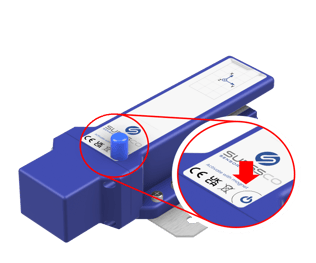 Step 1:
Place the activation magnet* on the marked area on the sensor for 3 seconds.
Step 2:
Wait for the confirmation tone:
- 2-second tone
- 10-second tone
- no tone
Activation – 6D sensor
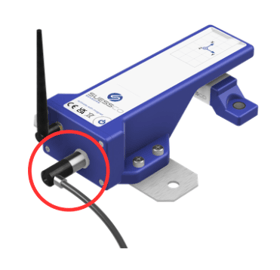 Step 1:
Connect the power supply. The 6D sensor / 3D Sensor XT starts automatically as soon as power is available.
Step 2:
Wait for the confirmation tone:
- 2-second tone
- 10-second tone
- no tone
2-second tone:
Measurement and data transfer are started. This can take up to 3 minutes, depending on reception.
After a successful transfer, the measurement values are visible in the SuessCo DataHub.
No data in the dashboard? See: What to do with poor reception?
Notes:
A new activation is only possible after 30 seconds.
10-second tone:
The magnet was not detected correctly or was left on the sensor for too long.
Remove the magnet, wait 30 seconds, then repeat Step 1
No tone:
There are two possible reasons.
The sensor is currently in a measurement / transfer cycle:
-> Wait 30 seconds, then repeat Step 1.
The sensor has insufficient power supply:
For 3D Sensor XT or 6D sensor, check the connection to the battery case.
Check the battery voltage in the dashboard (if available).
If possible, replace the batteries.
*The activation magnet is included in the scope of delivery (inside the packaging).