
Preparation (for 3D-and 6D-Sensors)
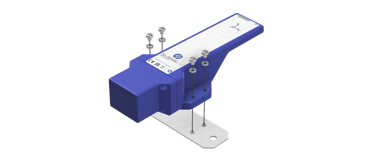
- Fasten the sensor to the mounting plate before installation.
Use the supplied screws and washers.
- Align the mounting plate correctly: the four raised bumps must face the sensor base (towards the sensor).
-
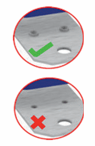
Place the sensor on the mounting plate so that the bumps engage into the sensor holes.
-
Insert one screw + washer per hole.
- Tighten crosswise with a 3 mm hex key; recommended tightening torque 1 Nm, max. 1.5 Nm.
Installation – 3D-Sensor
- Fix the drilling template at the intended position and drill at the marked points.
- Attach the reference magnet to the reference point and align it centered to the markings.
- Install the prepared sensor with mounting plate.
- Check the measuring range: max. 2 cm distance between sensor tongue and reference magnet; lateral clearance 3 cm on each side.
- Place the activation magnet on the power symbol for 3 seconds.
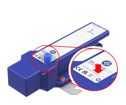
- Check the sensor data in the dashboard and set the zero point if required.
Installation – 6D-Sensor
-
Fix the drilling template at the intended position and drill at the marked points.
-
Attach the reference object / reference point and align it centered to the markings.
-
Install the prepared sensor with mounting plate.
-
Check the measuring range: max. 2 cm distance between sensor tongue and reference object; lateral clearance 3 cm on each side.
-
Connect the antenna to the antenna connector.
-
Install and connect the power supply (battery box or power supply box); the 6D sensor starts automatically when power is available.